Motivating scenario: We have now learned how to fit a regression, interpret a slope, quantify uncertainty, test a null hypothesis, check model assumptions, and compare parametric results to simulation-based approaches. Now you just want to do it!
Learning goals: By the end of this section, you should be able to:
Visualize a linear relationship with a scatterplot and regression line.
This chapter was a bit long. As a quick reference for doing a linear regression in R, I present a simple workflow. This does not mean you should ignore the rest of this chapter - it is key for understanding what goes into these functions and for helping you responsibly interpret this output.
Step 1: Plot the data
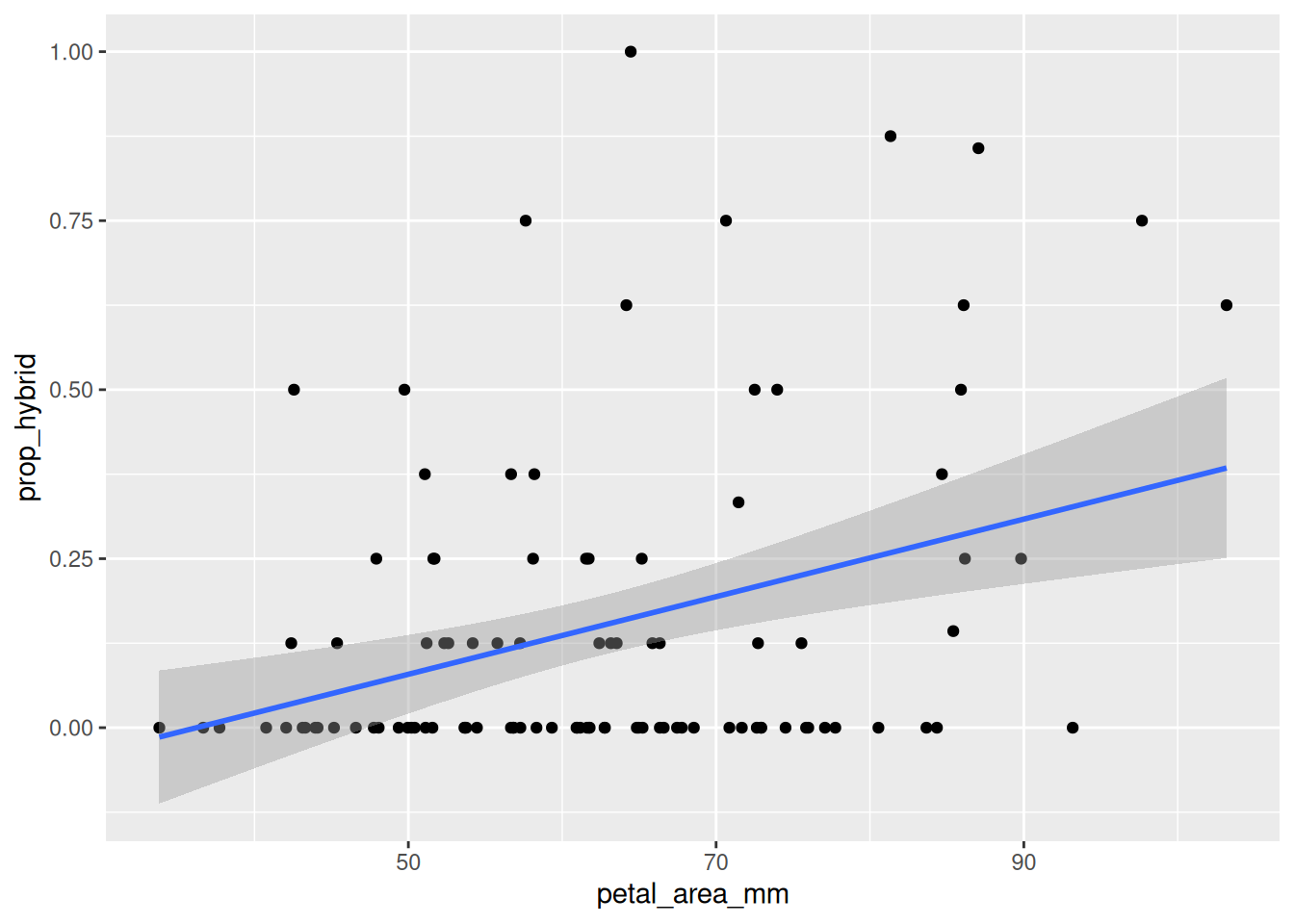
Remember ABP - Always Be Plotting. The first step in any analysis is to look at your data. The code below generates a simple plot with a regression line like Figure 1.
ggplot(gc_rils, aes(x = petal_area_mm, y = prop_hybrid)) +geom_point() +geom_smooth(method ="lm", se =TRUE)
Figure 1: Relationship between petal area and proportion hybrid seed in Clarkia RILs from the GC site. Points show individual RILs, and the blue line shows the fitted linear regression.
Step 2: Build a model
Now we fit the linear model of the expected proportion of hybrid seed as a linear function of petal area, with R’s lm() function.
hybrid_lm <-lm(prop_hybrid ~ petal_area_mm, data = gc_rils)
Step 3: Extract estimates and uncertainty
Base R’s summary() function gives a lot of useful information about the model:
summary(hybrid_lm)
Call:
lm(formula = prop_hybrid ~ petal_area_mm, data = gc_rils)

Residuals:
     Min       1Q   Median       3Q      Max
-0.32681 -0.14608 -0.05947  0.08676  0.83802

Coefficients:
               Estimate Std. Error t value Pr(>|t|)
(Intercept)   -0.207834   0.099466  -2.089 0.039176 *
petal_area_mm  0.005738   0.001555   3.691 0.000362 ***
---
Signif. codes:  0 '***' 0.001 '**' 0.01 '*' 0.05 '.' 0.1 ' ' 1

Residual standard error: 0.2246 on 101 degrees of freedom
Multiple R-squared:  0.1188,    Adjusted R-squared:  0.1101
F-statistic: 13.62 on 1 and 101 DF,  p-value: 0.0003625
We can also find confidence intervals with R’s confint() function: confint(hybrid_lm). Broom’s tidy function is even slicker!
tidy(hybrid_lm, conf.int =TRUE)
term
estimate
std.error
statistic
p.value
conf.low
conf.high
(Intercept)
-0.2078
0.0995
-2.0895
0.0392
-0.4051
-0.0105
petal_area_mm
0.0057
0.0016
3.6909
0.0004
0.0027
0.0088
Step 4: Generate diagnostic plots
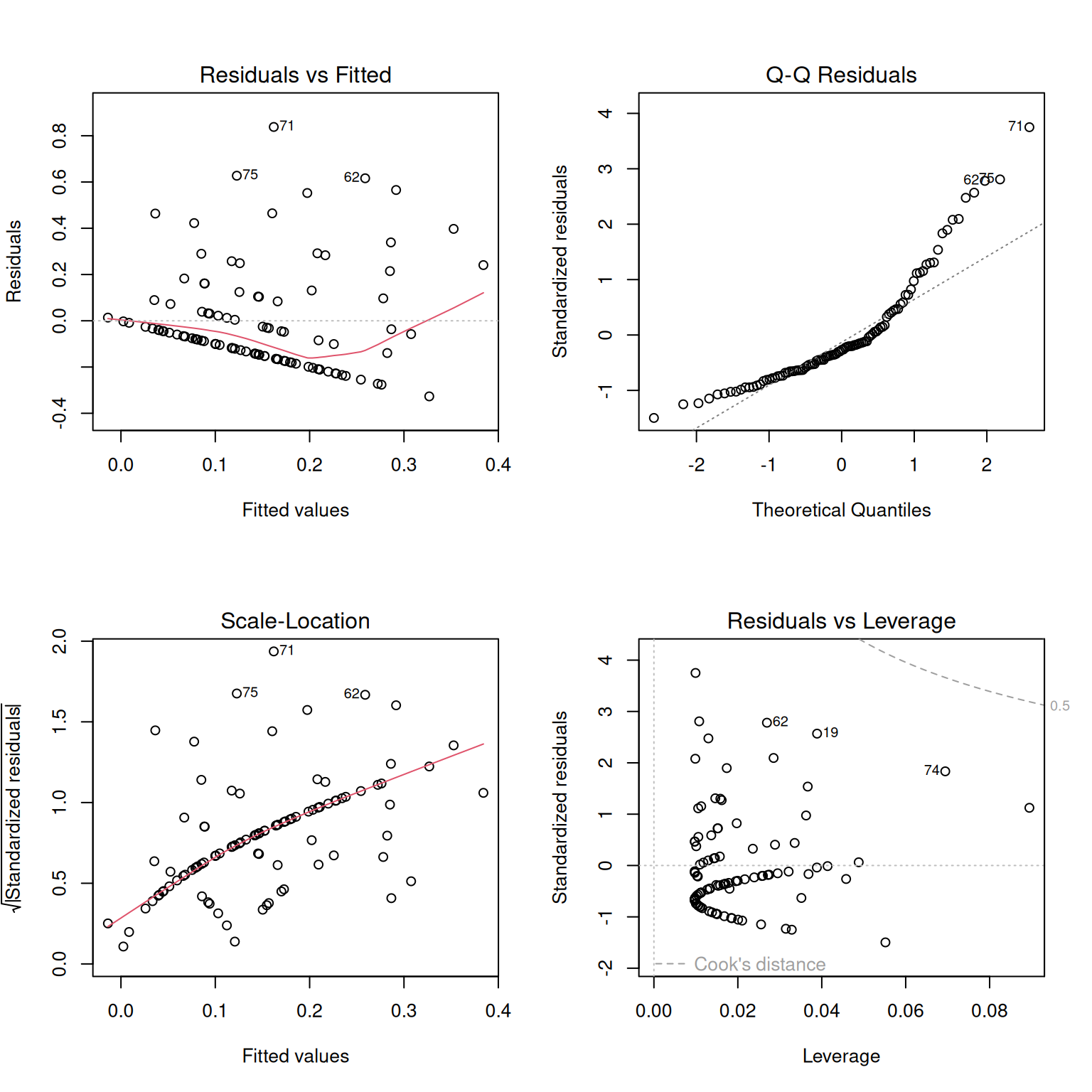
Before trusting the model too much, we should check whether the model looks reasonable. The plot() function in Base R generates a useful set of diagnostic plots (Figure 2) for lm() objects. See the section on regression assumptions for help on how to interpret these.
plot(hybrid_lm)
When you run this on your computer, R will show you one plot at a time. So for reproducible code, try the trick in the box below.
par(mfrow =c(2, 2))plot(hybrid_lm) # make base r plots 2x2par(mfrow =c(1, 1)) # reset layout
Figure 2: Diagnostic plots for the linear model of proportion hybrid seed as a function of petal area. The residuals vs. fitted plot helps identify nonlinearity or unequal variance; the Q-Q plot helps evaluate whether residuals are approximately normal; the scale-location plot gives another view of changing residual spread; and the residuals vs. leverage plot helps identify observations that may have unusually strong influence on the fitted model.
When data violate assumptions
If data violate assumptions, you have some options:
Build a more appropriate model (we will discuss this later).